
Keep coding with AI from your phone.
Check Codex and Claude Code progress, add instructions, and keep the original session on your computer moving. Ask the butler what needs your reply, or let it follow up within limits you set.
Watch the updated app demoConnect to your Mac or Linux computer over SSH. No agentBridge installation is needed on the computer.
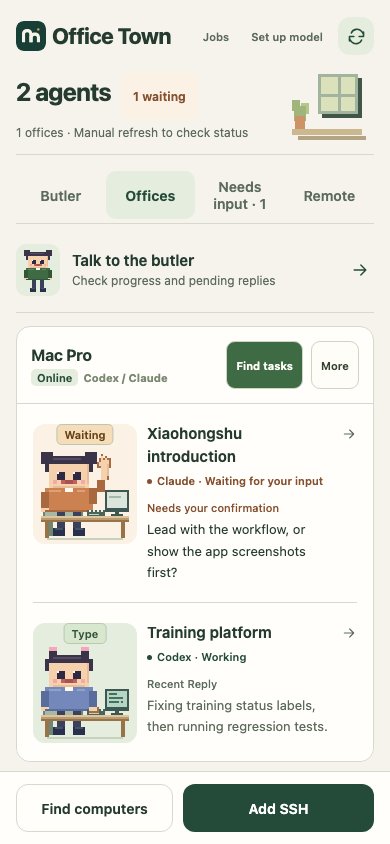
Keep coding with AI from your phone
Reply from your phone so the original session on your computer continues. Read the result, then ask the butler to help follow up.
Why I’m building Office Town
I want one place to keep track of the work.
I often have a few AI sessions open, working on a training platform in one and a Xiaohongshu draft in another. When I leave my computer, I still want to check progress and add instructions. Keeping the tasks and records together means fewer places to check.
I also want to stop watching every task once its requirements are clear. The butler can keep checking the work and ask when a decision needs me.
Phone supervision is experimental. You set the goal, scope, reply limit and duration, then accept the result yourself.
What you can do today
Work continues on your computer. Your phone lets you check it and reply.
Continue the same session
Read output and send a message back to the original Codex or Claude Code session. Check several computers in one app. Refresh to update task status.
Ask the butler about progress
Configure your model, then ask which tasks need a reply. The butler can look up records. Help me reply on an employee card writes a draft for you to edit and send.
Let the butler follow up
Set a goal and scope for one task. Automatic replies are off by default. When allowed, replies have count and time limits; decisions needing you stop the queue. Use an existing session or OpenHands.
Talk through a task
Use voice input or start an in-app call. Set up and test the chat model, speech recognition, and playback first.
Get your first reply through
Connect your computer first.
You can set up the butler and speech later.
Phone supervision (experimental)
Open Butler → Follow-up, add a task and set its goal and scope. Start with observation. Allow automatic messages only when ready, with a reply limit and duration.
A foreground notification stays visible. Battery restrictions, network loss and force-stopping can interrupt checks; reopen the app to inspect the queue. Pausing supervision does not stop work already running on the computer. You accept the result.
OpenHands requires your own Agent Server and an existing conversation. The phone supervises; code runs on a computer or server. Pi + pi-memory is an optional computer-side query and memory extension. Setup and limits
Connect your computer
- Use the LAN scan in the app, or enter your SSH address, username, and password or private key.
- Find and import existing Codex or Claude Code sessions on that computer.
- Open an employee card to read output and send a message back to the session.
Start a Codex or Claude Code session on your computer first. Tap refresh to get the latest status. Away from your home network, use a reachable SSH address or your own FRP connection.
For help with a reply, configure the butler model and request a draft from the employee card. Drafts use the last refreshed records. Choose one, edit it, and send it yourself.
Set up chat and voice
- Open the butler model settings. Enter your provider URL, model name, and API key, then save and verify the connection.
- Send a text message and check that the model replies.
- Test speech playback in voice settings, then test recognition with the microphone beside the chat input.
- Once both work, start a call with the butler and allow microphone access.
The English edition uses English controls, butler replies and speech settings. Original task records keep their own language. If system speech services are unavailable, you can configure a Bailian / DashScope Beijing-region API key in the cloud voice settings. Chat and speech can use different keys.
The butler can query tasks and discuss their output. Send instructions from an employee card.
Install and update
Requires Android 7.0 or later. Download and install the APK. On your first install, Android may ask you to allow installation from your browser. Future English releases can update this English app. It installs separately from the Chinese edition and uses its own settings and records.
APKs are published on GitHub Releases and signed with the same release key. If the download does not start, find agentbridge-en.apk under All releases.
Data and privacy
Settings, conversations, and records are stored in the app’s private storage on your phone. Credentials are encrypted with Android Keystore. The app has no analytics reporting.
Butler chat sends relevant task information to the model provider you configure. With Bailian cloud speech enabled, audio or playback text is sent to Bailian. Read the security notes for details.
Stuck setting up SSH, finding a session, or sending a reply? Tell us where you got stuck. Include your app version and whether you use Codex or Claude Code. Leave out passwords and API keys.
Start with the tasks you already have
Android 7.0 or later.